Your next admission isn't won at the school gate. It's won on a parent's phone, months earlier: a DM answered at 10:47 at night, a Google review replied to, a Google Ads campaign that lands the week families are deciding. Here's how a school team runs all of it from one place, in about two hours a week.
Ask a school principal how communication actually happens today, and you'll usually get a familiar story. The circular went home in a school bag. The fee date is in a PDF nobody opened. A parent asks a question the school answered last week, in a WhatsApp group the school is in, and in three it isn't. A teacher posts photos on Instagram when there's time. Google reviews pile up unanswered. And a family weighing the school finds a Google page that hasn't changed since last term.
None of this is a people problem. It's a plumbing problem: the school's relationship with its families lives in ten disconnected places. What a school needs is not an agency retainer. It's one platform that sends what the school needs to send, answers parents from the school's own words, and keeps the school visible where parents look.
That's eKTextAI: a parent-communication and admissions engine for K-12 schools, built by MarvelSoft Ventures, Bangalore, serving schools since 2009. One system, run by the school's own team, with the school at the centre and six engines around it.
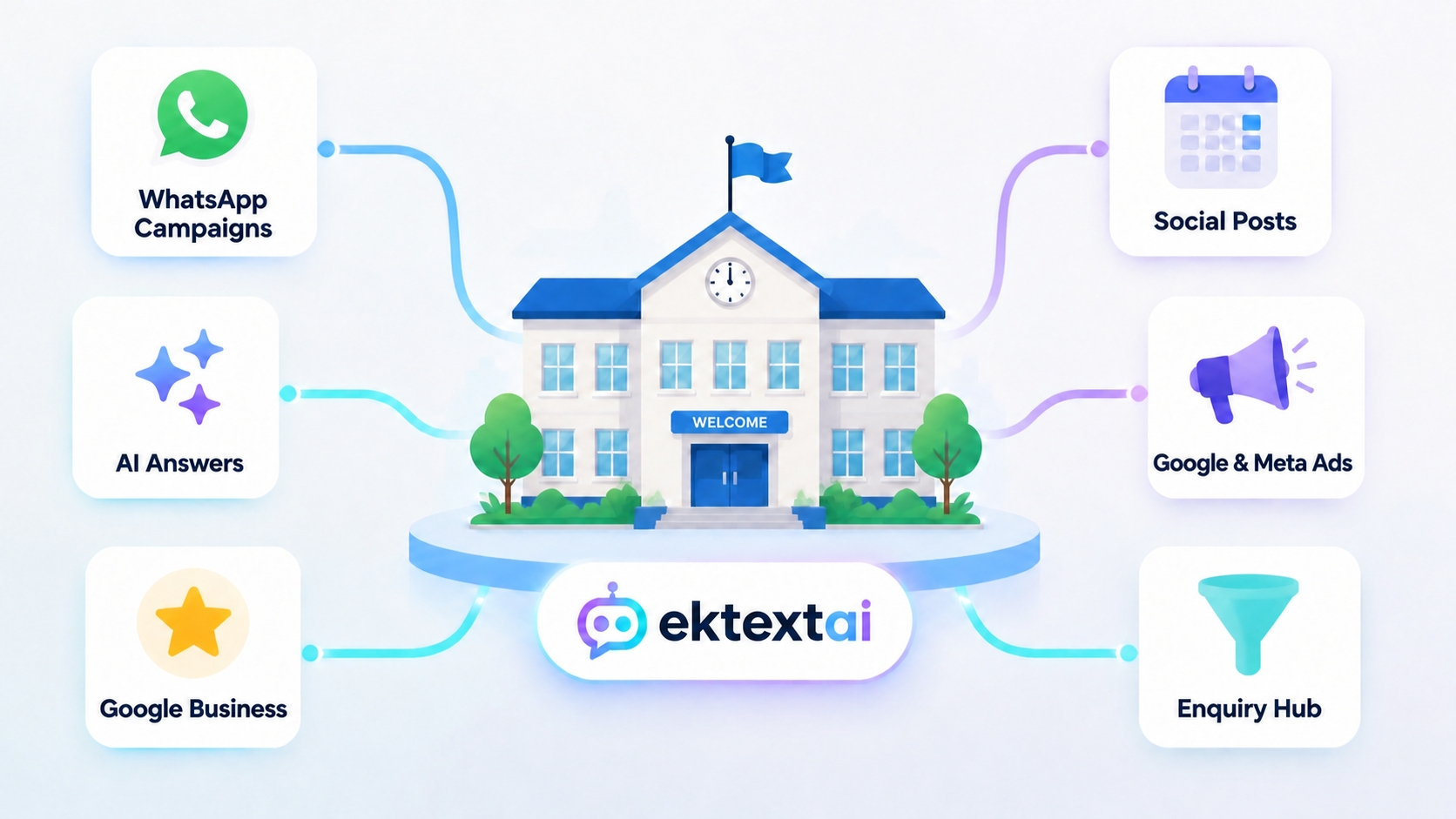
The six engines, and what each one quietly takes off your plate
1. WhatsApp & email campaigns: the outreach engine
Notices, fee reminders and admissions campaigns, sent on WhatsApp and email from one place. Messages go out on templates approved in the school's own Meta account: the school keeps its account, its templates and its spend. One campaign is one audience and one message set, however many channels carry it, so a WhatsApp-and-email campaign counts once. On the Growth plan and above, campaigns go out on their own, and sequences run the follow-ups: a first message, a nudge if there's no reply, a further message after a set interval, each step set by the school.
2. AI answers across WhatsApp, web, Instagram & Facebook: the 24×7 front office
This is the engine that changes the numbers. Parents ask wherever they already are: WhatsApp, the school's website widget, a Facebook message, an Instagram DM. "What's the fee structure?" "When do admissions open?" "What documents do we need?" eKTextAI answers at once, drawn from the school's own circulars, policies and notices. The answer is the school's answer, not a generic one.
A parent is answered in the language they wrote in where it is one of the six we support (English, Hindi, Kannada, Tamil, Malayalam and Telugu) and in English otherwise. A translation can be imperfect, and the school's document in its original language governs.
When a question can't be answered from the school's material, it says so and hands the conversation to a member of the school's staff, because the questions that deserve a person get one. And the questions that used to eat the front office's morning? Answered at midnight, correctly, from the circular already in the drawer.
3. Google Business & review replies: the trust engine
When a parent searches "schools near me", the star rating and the freshness of the Google page do more persuading than any brochure. The platform keeps the Google Business profile alive with posts and updates, and replies to the reviews parents leave. Five stars get a warm, professional thank-you. A low rating deserves a phone call, not a template, so the school sees it and decides. On the Business plan that's two Google Business updates a month, and the page stops looking like it closed in March.
4. Social posts, published for you: the showcase engine
Parents judge a school's culture through its social channels long before they judge it through its results. Here the division of labour is honest: the school supplies the material (the sports-day photos, the science-fair clips, the topper felicitation) and eKTextAI schedules it and posts it to the channels the school has connected: Facebook, Instagram, LinkedIn and YouTube. We publish it; we do not write or design it. Twelve posts a month on Growth, twenty-four on Enterprise; unused posts do not roll over. On Business, the two a month are Google Business updates only. The school keeps the voice, and the "who's posting this week?" problem goes away.
5. Google & Meta ads: the reach engine
Admission season runs on search and social, and the platform runs the school's local ads on both: geo-targeted "schools near me" search ads on Google, and Facebook and Instagram campaigns to parents nearby. You own the creative and the spend. Local ads on two channels on Growth, four on Enterprise. Switched on in October and off in March, they spend only when families are actually deciding.
6. The enquiry hub: every lead in one place
A simple CRM collects every enquiry: from WhatsApp, the website widget, Instagram and Facebook, campaigns, and on Enterprise, from JustDial and IndiaMART too, so a parent searching a listings site lands in the same place as one who messaged the school directly. Because enquiries land in one place, you can see which campaigns bring families in. Every conversation a parent has with the engine is visible to the school and to the staff it authorises, so follow-up happens from one queue, not five inboxes. Nothing depends on one staff member's phone.
What this looks like on a real week
Monday, 9:10 AM. The marketing coordinator opens eKTextAI with her morning tea. She picks three photos from Saturday's sports day for this month's social posts, uploads the new fee circular, and sets the week's admissions campaign: one audience, WhatsApp and email. Approved and scheduled by 9:40.
Tuesday, 6:00 PM. The fee-reminder campaign goes out: one campaign, every parent on the list, WhatsApp and email both. On Growth, next week's follow-up sequence is already set to run on its own.
Wednesday, 10:47 PM. A parent of a four-year-old messages the school's Facebook page: "Admission fees?" The engine answers in seconds from the fee circular: the range, the timeline, the documents. The conversation sits in the counsellor's morning queue, with full context.
Thursday, 11:30 AM. A five-star review arrives: "Wonderful teachers, very caring." The reply is up before the coordinator finishes her staff meeting. This month's second Google Business update, the annual-day photos, goes live on the school's page.
Friday, 4:00 PM. The weekly report: 41 enquiries from the Google Ads campaign at ₹38 each, 12 DM conversations answered across Instagram and Facebook, 3 campus visits booked from the replies, and the two ad channels reviewed, budget on track. The coordinator forwards it to the principal and shuts her laptop.
Total human time this week: about two hours.
An illustrative week. The figures are an example, not a promise of results.
Who actually runs it (spoiler: they're already on your payroll)
The system doesn't need a marketing department. It needs three hats your school already owns:
- A marketing coordinator, often an existing teacher or admin staff member, who picks the material, sets the campaigns and reads the weekly report. Roughly two hours a week.
- The front office or counsellor, who follows up on the enquiries the engine captures. They get warmer leads than any walk-in queue, and the repetitive questions are already answered.
- The principal, whose job is the approve button and the budget line, with the peace of mind that the engine only ever says what the school's own circulars say.
An agency becomes optional: useful for a big campaign or professional photography, but no longer the thing standing between the school and its own presence.
| Engine | What runs on its own | Who owns it | Time / week |
|---|---|---|---|
| WhatsApp & email campaigns | Sends from one place on the school's approved templates; one campaign counts once across channels; sequences run on their own (Growth and above) | Coordinator drafts, principal approves | ~30 min |
| AI answers (WhatsApp, web, Instagram & Facebook) | Answers from your circulars on every channel parents use; hands what it can't answer to staff; voice answers (Growth and above) | Front office (follow-up only) | ~0 min |
| Google Business & reviews | Two Google Business updates a month on Business; replies to your reviews; low ratings left to a person | Front office | ~15 min |
| Social posts | Schedules and publishes your material to Facebook, Instagram, LinkedIn and YouTube: 12 a month on Growth, 24 on Enterprise | Coordinator picks the material | ~30 min |
| Google & Meta ads | Local ads on Google, Facebook and Instagram: 2 channels on Growth, 4 on Enterprise; you own the creative and the spend | Coordinator monitors, principal approves the budget | ~20 min |
| Enquiry hub & CRM | Every enquiry in one CRM; JustDial & IndiaMART enquiries (Enterprise); conversations visible to authorised staff | Counsellor (follow-up) | ~15 min |
About 110 minutes a week of human time, for a presence that never sleeps.
What it costs, and what it doesn't
Plans are priced per school, per month. We never charge per student or per answer. The Starter plan is free and stays free: 200 parent accounts, one staff seat and two campaigns a month, so the engine can be tried on the school's own circulars before anyone pays anything.
- Business: ₹3,250 + ₹585 GST = ₹3,835 a month. Adds your Google page with two Google Business updates a month, replies to your reviews, and 1,200 parent accounts.
- Growth: ₹6,250 + ₹1,125 GST = ₹7,375 a month. Adds automation, voice answers, the CRM, 12 social posts a month and local ads on two channels.
- Enterprise: ₹20,250 + ₹3,645 GST = ₹23,895 a month. Runs it across campuses, with 24 social posts a month, four ad channels and JustDial and IndiaMART enquiries.
Pay for the twelve months at once and pay 20% lower: Business works out to ₹3,068 a month. Setup takes 30 minutes to a day. Your first campaign also waits for Meta's approval of the template you submit in your own account, which is outside our clock. Every limit is on the pricing page.
Why this builds local authority, and why it compounds
Individually, each engine is a convenience. Together, they do something bigger: they make the school the default answer in its locality.
Consistent posts create presence. A live Google page creates trust. Ads on Google and Meta create reach at the moment a family is deciding. Quick, accurate answers turn interest into a campus visit. Run all of it for two admission cycles, and the school stops chasing visibility: families arrive already convinced.
That's what "local authority" means for a school: when a parent in your neighbourhood types "schools near me", asks in the housing-society WhatsApp group, or checks a listings site while shortlisting, you are the school they find first, see most and trust fastest. Authority isn't claimed in a brochure. It's built in public, one answer, one review, one campaign at a time.
The guardrails that keep it authentic
- It won't guess. The engine answers only from the school's own circulars, policies and notices, and says so when it can't, handing the question to a person at the school.
- The hard cases go to people. Questions it can't answer go to the school's staff with the full conversation attached, visible to the people the school authorises.
- The accounts and the spend stay the school's. The WhatsApp account, its templates and the ad accounts sit with the school. You own the creative and the spend.
- The data stays the school's. For student, parent and staff data, the school is the Data Fiduciary under India's Digital Personal Data Protection Act, 2023 — it decides why and how the data is used and takes consent. MarvelSoft Ventures acts as the school's Data Processor: we process that data only on the school's written instructions, under a Data Processing Agreement. We protect school, parent and student data with encryption in transit and at rest, role-based access controls, and regular backups.
See your school at the centre of this picture.
Campaigns, answers, Google Business, social posts, local ads and one enquiry hub, in one platform your own team can run. Start free on the Starter plan, or bring one circular to a demo and judge the answers yourself.
Plans, prices, GST and limits are as on ektextai.com/pricing and subject to the plan terms there. The week above is illustrative.